Prism File Explorer for Android

Prism File Explorer

Raival

version 1.3.2

Full-featured and lightweight file managing app

Downloads 25 K
Ads

Rate & Review

Antivirus & safety scan results

Scan Date: Sep 12, 2025 Software Version: 1.3.2
Status: ✅ Trusted & Safe to install This app is signed by Raival with trusted and verified digital signature and it will updated existing Prism File Explorer installations Certificate fingerprint: 530d7a6e3f580735dee2782644c86fa609a0288f Issuer: CN=Raival, OU=None, O=None, L=Oman, ST=Oman, C=OM How we verify APK files security
Android antivirus Status
K7GW Clean ✅
DrWeb Clean ✅
VirIT Clean ✅
ClamAV Clean ✅
Google Clean ✅
Ikarus Clean ✅
Lionic Clean ✅
Sophos Clean ✅
Yandex Clean ✅
Alibaba Clean ✅
Tencent Clean ✅
Xcitium Clean ✅
Fortinet Clean ✅
Kingsoft Clean ✅
Symantec Clean ✅
AhnLab-V3 Clean ✅
Kaspersky Clean ✅
Microsoft Clean ✅
Trustlook Clean ✅
ESET-NOD32 Clean ✅
Avast-Mobile Clean ✅
NANO-Antivirus Clean ✅
BitDefenderFalx Clean ✅

Prism File Explorer app for Android review by AndroidFreeware

Easily manage all the files stored on your Android. Managing files on your mobile device can be a bit of a hassle. Luckily there are tools like this app from the Android toolbox that provide us with a simple alternative to the native file explorer.

Prism File Explorer: How to easily manage all the files on your Android

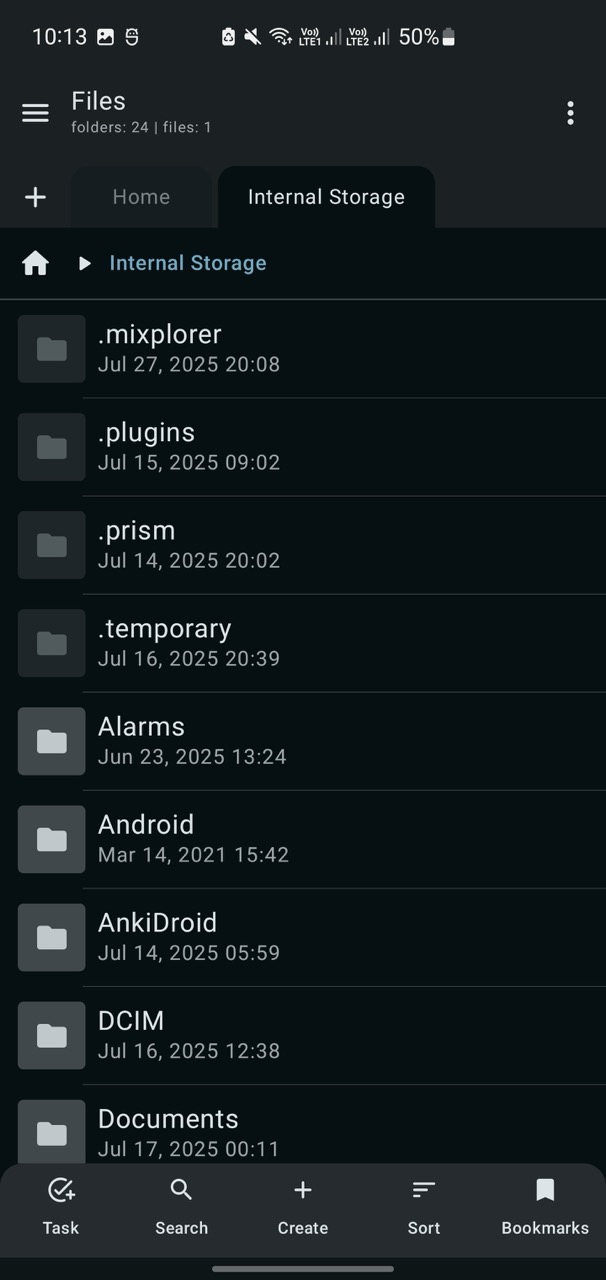
Prism File Explorer is an interesting file manager for Android devices that stands out for its elegant interface and ease of use. It is developed in Kotlin with Jetpack Compose.

The first thing we will have to do after downloading the APK file will be to grant the corresponding permissions to the app. But the coolest thing is that we can control the system and all the folders from the menu with icons and tabs to make it more intuitive.

Complete file management for Android devices with a beautiful user interface design.

From the main menu we will be able to access to all the folders, but we also have a shortcut to the internal memory and to the SD card of the terminal. In addition, it also allows us to manage the cloud files that we store in Google Drive, OneDrive and Dropbox.

On the other hand, it offers us the possibility of performing multiple operations at the same time and even to cut, copy and paste elements with visual feedback to know what we are doing (or not). We can also change the appearance of the interface with different themes, free up space more easily and access a detailed file information window.

In general, it is an excellent tool that complements the Android file explorer and falls short only in the absence of a specific calculator or converter function. But, hey, it's free.

Reviewed By:

Content Editor

What's new in v1.3.2

  • Enhanced Image Viewing: Full quality image display with customizable options like column count, item size, gallery mode, and thumbnail cropping.
  • Quick File Access: Pin files to the home screen for instant access.
  • Improved Navigation: Swipe down to close tabs and copy file paths directly from the breadcrumbs bar.
  • Session Persistence: Option to remember and restore last opened tabs.
  • Folder-Based Categories: Category tabs now organized by folders.
  • Exclude Folders: Customize which folders to exclude from scanning in recent files.
  • Preference Management: Export and import app preferences for backup or sharing.
  • Improved Sorting: Enhanced name sorting using neutral ordering.

Ads


Specifications


Old Versions

Prism File Explorer icon

1.3.1 APK

August 15, 2025

Prism File Explorer icon

1.3.0 APK

July 29, 2025

Prism File Explorer icon

1.2.1 APK

April 2, 2025