Network Switch for Android

Network Switch

Ameya Vijay Unchagaonkar

version 1.1.0

One-tap network switching for Android

Downloads 3 K
Ads

Rate & Review

Antivirus & safety scan results

Scan Date: Oct 2, 2025 Software Version: 1.1.0
Status: ✅ Trusted & Safe to install This app is signed by Ameya Vijay Unchagaonkar with trusted and verified digital signature and it will updated existing Network Switch installations Certificate fingerprint: 772cd38ffc9a0b3995daf3113f5d67fd5380a348 Issuer: C=IN, ST=Maharashtra, L=Kolhapur, O=NA, OU=NA, CN=Ameya Unchagaonkar How we verify APK files security
Android antivirus Status
K7GW Clean ✅
DrWeb Clean ✅
VirIT Clean ✅
ClamAV Clean ✅
Google Clean ✅
Ikarus Clean ✅
Lionic Clean ✅
Sophos Clean ✅
Yandex Clean ✅
Alibaba Clean ✅
Tencent Clean ✅
Xcitium Clean ✅
Fortinet Clean ✅
Kingsoft Clean ✅
Symantec Clean ✅
AhnLab-V3 Clean ✅
Kaspersky Clean ✅
Microsoft Clean ✅
Trustlook Clean ✅
ESET-NOD32 Clean ✅
Avast-Mobile Clean ✅
NANO-Antivirus Clean ✅
BitDefenderFalx Clean ✅

Network Switch Connectivity app for Android description

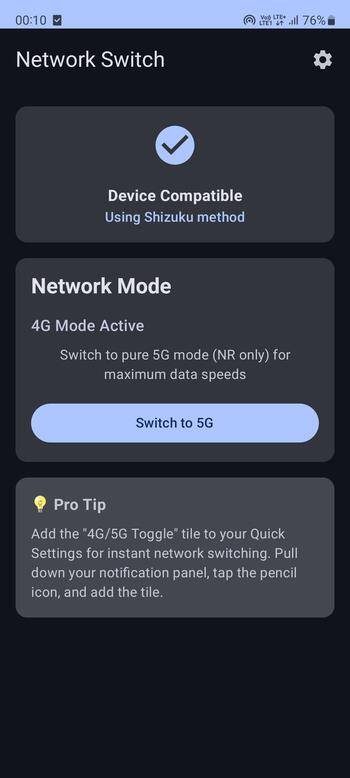
Network Switch enables you to toggle between 4G and 5G network modes with dual control methods: Root access for rooted devices and Shizuku for non-rooted devices.


Purpose

Network Switch allows Android users to manually control their device's network preference between pure 4G (LTE-only) and 5G (NR-only) modes. This is useful for:

  • Quick network switching through Quick Settings tile
  • Optimizing battery life by forcing 4G mode
  • Maximizing speed by forcing 5G mode where available
  • Managing data usage and connectivity preferences

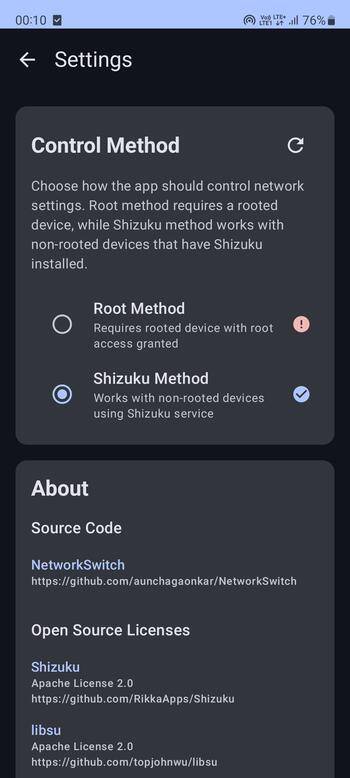
The app provides two methods of operation:

  • Root Method: Direct system access for rooted devices
  • Shizuku Method: System access through Shizuku service for non-rooted devices

Features

  • Pure network mode switching (LTE-only for 4G, NR-only for 5G)
  • Quick Settings tile for instant access
  • Dual control methods (Root and Shizuku)
  • Modern Material Design 3 interface
  • Clean architecture implementation
  • Privacy-focused (no internet permissions)
  • Intelligent device compatibility detection
  • Automatic fallback for unsupported devices

What's new in v1.1.0

  • Users can now switch between any 2 network modes of their preference, supporting 34 modes.
  • Adaptive icons supporting various types of launchers and Android's material design.

Ads


Specifications


Old Versions

Network Switch icon

1.0.0 APK

September 13, 2025