PlayOnDlna per Android

PlayOnDlna

scovillo

versione 1.16

Play Youtube videos ad-free on DLNA players (e.g. Kodi) in your local network!

Download 8 K
Ads

Valuta questa

☆ ☆ ☆ ☆ ☆

Risultati scansione antivirus e sicurezza

Data Scansione: Sep 26, 2026 Versione Software: 1.16
Stato: ✅ Affidabile & Sicuro da installare Questa app è firmata da scovillo con firma digitale affidabile e verificata e aggiornerà le installazioni esistenti di PlayOnDlna Impronta Digitale del Certificato: d734e4b2623f84fc4e13b0be6ed379c1e30bd15b Emittente: C=DE, ST=Rheinland-Pfalz, L=Zweibrücken, O=Spicy Sources, OU=Softwareentwicklung, CN=Lukas Scheerer Come verifichiamo la sicurezza dei file APK
Antivirus Android Stato
K7GW Pulito ✅
DrWeb Pulito ✅
VirIT Pulito ✅
ClamAV Pulito ✅
Google Pulito ✅
Ikarus Pulito ✅
Lionic Pulito ✅
Sophos Pulito ✅
Yandex Pulito ✅
Alibaba Pulito ✅
Tencent Pulito ✅
Xcitium Pulito ✅
Fortinet Pulito ✅
Kingsoft Pulito ✅
Symantec Pulito ✅
AhnLab-V3 Pulito ✅
Kaspersky Pulito ✅
Microsoft Pulito ✅
Trustlook Pulito ✅
ESET-NOD32 Pulito ✅
Avast-Mobile Pulito ✅
NANO-Antivirus Pulito ✅
BitDefenderFalx Pulito ✅

PlayOnDlna Duplicazione Schermo applicazione per Android descrizione

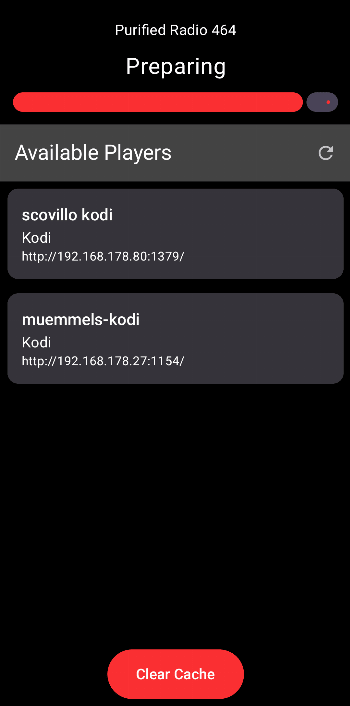
Play YouTube videos ad-free on DLNA players (e.g. Kodi, SmartTV) in your local network! Browse YouTube in your favorite client and share the link to the PlayOnDlna app to play the video ad-free on a DLNA player in your local network.

🎨 Sleek Design
A graphical interface reduced to the essentials in a dark design that's easy on the eyes even at night.

💝 Ad-Free
Enjoy videos ad-free on your local network.

🤩 Simple
Ad-free playback at the touch of a button without complex setup! An automated search finds compatible players on your local network.

👐 Transparency
The publicly accessible source code allows anyone to personally verify the quality, privacy, and security.

If the app serves you well, consider a 🎁 donation to support my efforts.

Kodi Setup
To stream videos to Kodi, you have to ensure that Kodi is found as dlna player in your local network. To achieve this, follow the instructions below.
1. Go to ⚙ Settings > Services > UPnP DLNA
2. Enable Enable UPnP support
3. Enable Allow remote control via UPnP

❤️ Happy streaming! ❤️

Ads


Specifiche


Versioni Precedenti

PlayOnDlna icon

1.15 APK

September 4, 2026

PlayOnDlna icon

1.14 APK

August 29, 2026

PlayOnDlna icon

1.13 APK

August 23, 2026