DNS Toggle Tự động hóa ứng dụng cho Android mô tả
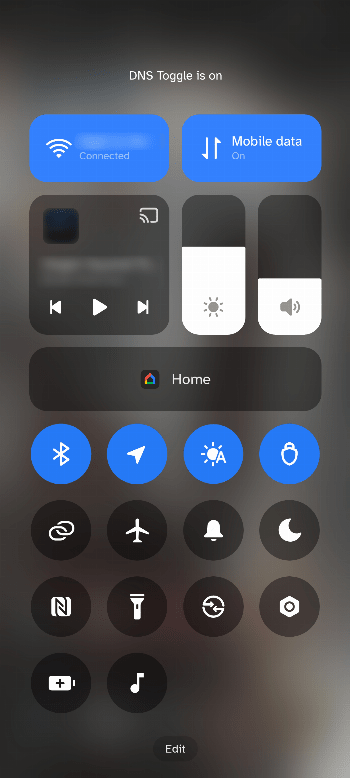
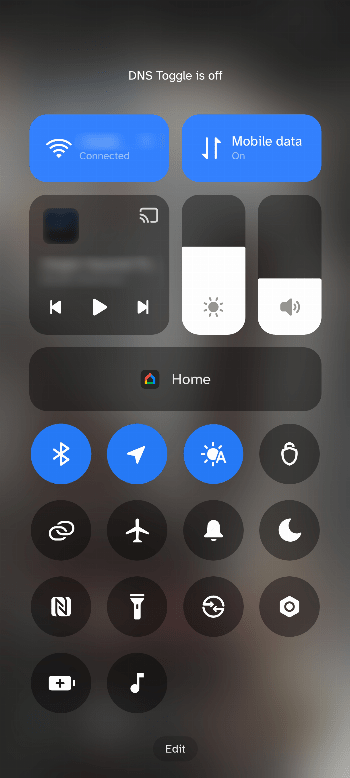
DNS Toggle is a small Android app that allows you to easily toggle and automate your phone's Private DNS through the Quick Settings panel.
IMPORTANT:
To modify Private DNS system settings, this app requires the WRITE_SECURE_SETTINGS permission. You must either have a rooted device, use Shizuku, or manually grant it via ADB:
adb shell pm grant com.ericlowry.dnstoggle android.permission.WRITE_SECURE_SETTINGS
Features
- Quick Settings Tile: Toggle Private DNS on/off directly from the Quick Settings panel.
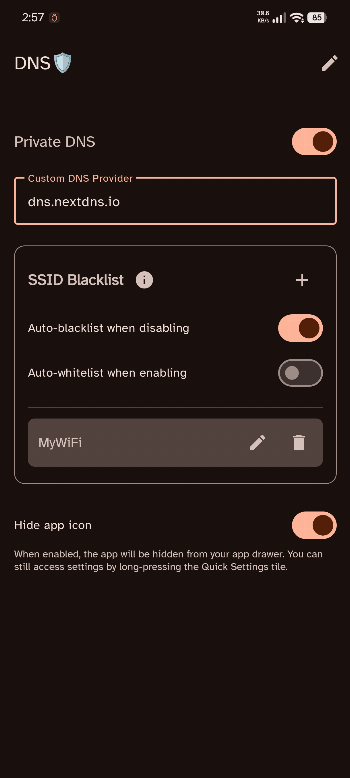
- Custom DNS Providers: Define one or more preferred hostnames (e.g., dns.nextdns.io) and seamlessly switch between them.
- Wi-Fi Filtering: Automatically disable Private DNS when connected to specific Wi-Fi networks.
- Automatic Blocking: Automatically blacklists the current Wi-Fi SSID when Private DNS causes connectivity issues.
- VPN Override: Automatically enforce a specific DNS hostname or disable Private DNS entirely whenever a VPN is active on your device.
- Backup & Restore: Export and import your configuration via password-encrypted files.
- Dynamic Tile Labeling: Rename the Quick Settings tile.
- Hide App Icon: Keep your home screen clean while maintaining access via the Quick Settings tile.
Privacy & Permissions
- No tracking, no ads, and no data collection.
- Location permissions are optional, and only used to identify Wi-Fi network names for the SSID Filter feature. They are never used to track your physical location.