Screenlite Web Kiosk জন্য Android

Screenlite Web Kiosk

Screenlite

ভার্সন 0.0.11

Displays web content in full-screen mode

ডাউনলোড 192
Ads

এটি রেট করুন

অ্যান্টিভাইরাস এবং নিরাপত্তা স্ক্যানের ফলাফল

স্ক্যানের তারিখ: Sep 23, 2025 সফটওয়্যার সংস্করণ: 0.0.11
অবস্থা: ✅ বিশ্বাসযোগ্য এবং ইনস্টল করার জন্য নিরাপদ এই অ্যাপটি Screenlite এর দ্বারা বিশ্বাসযোগ্য এবং যাচাইকৃত ডিজিটাল স্বাক্ষর দ্বারা স্বাক্ষরিত হয়েছে এবং এটি বর্তমান Screenlite Web Kiosk ইনস্টলেশনগুলিকে আপডেট করবে সার্টিফিকেট ফিঙ্গারপ্রিন্ট: 1a06b791e1589ab23886ed90d8a7d2762df5d51f ইস্যুকারী: C=Unknown, ST=Unknown, L=Unknown, O=Screenlite, OU=Screenlite, CN=514sid আমরা APK ফাইলের নিরাপত্তা কিভাবে যাচাই করি
অ্যান্ড্রয়েড অ্যান্টিভাইরাস অবস্থা
K7GW পরিষ্কার ✅
DrWeb পরিষ্কার ✅
VirIT পরিষ্কার ✅
ClamAV পরিষ্কার ✅
Google পরিষ্কার ✅
Ikarus পরিষ্কার ✅
Lionic পরিষ্কার ✅
Sophos পরিষ্কার ✅
Yandex পরিষ্কার ✅
Alibaba পরিষ্কার ✅
Tencent পরিষ্কার ✅
Xcitium পরিষ্কার ✅
Fortinet পরিষ্কার ✅
Kingsoft পরিষ্কার ✅
Symantec পরিষ্কার ✅
AhnLab-V3 পরিষ্কার ✅
Kaspersky পরিষ্কার ✅
Microsoft পরিষ্কার ✅
Trustlook পরিষ্কার ✅
ESET-NOD32 পরিষ্কার ✅
Avast-Mobile পরিষ্কার ✅
NANO-Antivirus পরিষ্কার ✅
BitDefenderFalx পরিষ্কার ✅

Screenlite Web Kiosk স্ক্রীন মিররিং অ্যাপ জন্য Android বর্ণনা

Screenlite Web Kiosk is a simple Android kiosk browser app that displays web content in full-screen mode.


Key Features

  • Displays any website in immersive full-screen mode
  • Automatically launches on device boot
  • Brings itself back to the foreground if minimized
  • Clicking and scrolling are disabled in WebView on TV
  • Supports website rotation (0°, 90°, 180°, 270°), even if the device doesn’t support orientation changes
  • Automatic retry mechanism with exponential backoff for network failures
  • Automatically injects responsive viewport meta tags
  • Special UI adaptations for Android TV devices
  • Hides system bars and navigation elements
  • Prevents device from going to sleep
  • Real-time network connectivity monitoring
  • Error handling with user-friendly messages
  • Compatible with both Android TV and mobile devices

Usage Instructions

  1. Install the APK on your Android device.
  2. Grant the Display over other apps permission to Screenlite Web Kiosk.
  3. Launch the app.
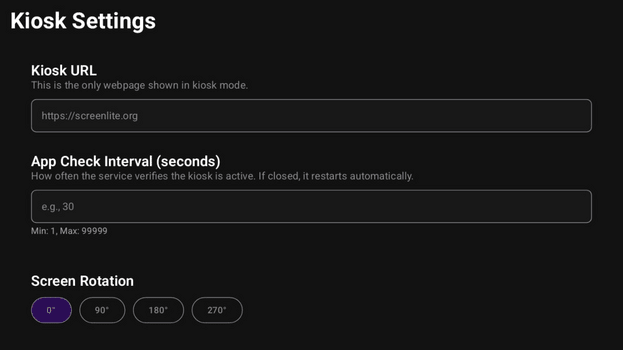
  4. Access settings by tapping the screen 5 times quickly in the bottom-left corner on a mobile device, or by pressing the center button (OK) on a TV remote.
  5. Enter the website URL you want to display.
  6. Set the app visibility check interval (recommended 5–10 seconds). If you need time to configure the device, set a higher number.
  7. Choose screen rotation if needed.
  8. Save your settings; the app will restart with the new configuration.
Ads


স্পেসিফিকেশন


পুরোনো সংস্করণ

Screenlite Web Kiosk icon

0.0.9 APK

September 18, 2025

Screenlite Web Kiosk icon

0.0.8 APK

September 17, 2025

Screenlite Web Kiosk icon

0.0.7 APK

September 14, 2025


এটি রেট করুন


ব্যবহারকারীর পর্যালোচনা সম্পর্কিত Screenlite Web Kiosk

Screenlite Web Kiosk এ এখনও কোন মন্তব্য নেই। প্রথম হোন!

GitHub Issue