Screenlite Web Kiosk 屏幕镜像 应用 为 Android 描述
Screenlite Web Kiosk is a simple Android kiosk browser app that displays web content in full-screen mode.
Key Features
- Displays any website in immersive full-screen mode
- Automatically launches on device boot
- Brings itself back to the foreground if minimized
- Clicking and scrolling are disabled in WebView on TV
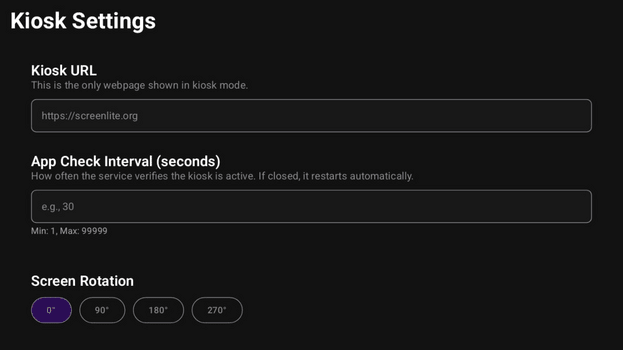
- Supports website rotation (0°, 90°, 180°, 270°), even if the device doesn’t support orientation changes
- Automatic retry mechanism with exponential backoff for network failures
- Automatically injects responsive viewport meta tags
- Special UI adaptations for Android TV devices
- Hides system bars and navigation elements
- Prevents device from going to sleep
- Real-time network connectivity monitoring
- Error handling with user-friendly messages
- Compatible with both Android TV and mobile devices
Usage Instructions
- Install the APK on your Android device.
- Grant the Display over other apps permission to Screenlite Web Kiosk.
- Launch the app.
- Access settings by tapping the screen 5 times quickly in the bottom-left corner on a mobile device, or by pressing the center button (OK) on a TV remote.
- Enter the website URL you want to display.
- Set the app visibility check interval (recommended 5–10 seconds). If you need time to configure the device, set a higher number.
- Choose screen rotation if needed.
- Save your settings; the app will restart with the new configuration.