File Navigator File Managers app for Android description
Welcome to File Navigator - Your Ultimate File Sorting Solution!
Are you tired of cluttered files on your device? Seeking a streamlined way to organize and manage them? Look no further! File Navigator is here to transform your file management experience.
Key Features:
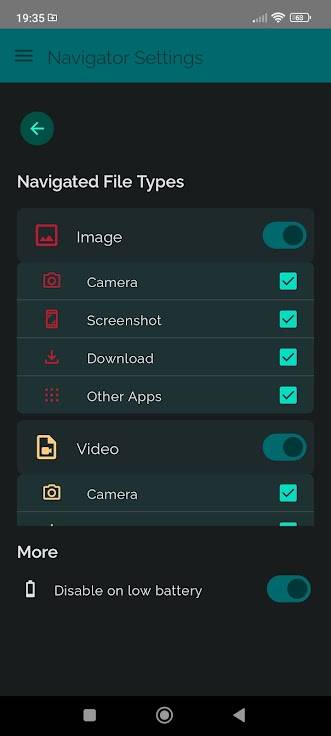
- 🔍 File Type Customization: File Navigator puts you in control. Select the specific file types you want to navigate, including Images, Videos, Audio, Text, APKs, PDFs, and Archives.
- 📁 Effortless File Organization: Configure the app to match your preferences. File Navigator allows you to define where different file types should be stored, ensuring they end up in the right place every time.
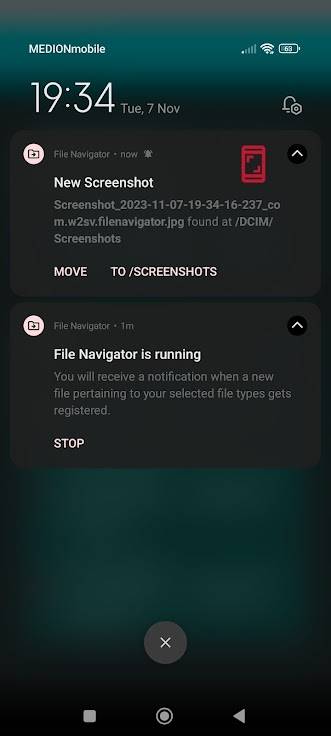
- 📬 Instant Notifications: When new files of your chosen file types are detected in your system, File Navigator sends you instant notifications. No more surprises - you’ll always be up-to-date.
- 🚀 Seamless File Movement: With a simple tap from the notification, you can select the destination folder for the new file. No more manual searching and sorting.
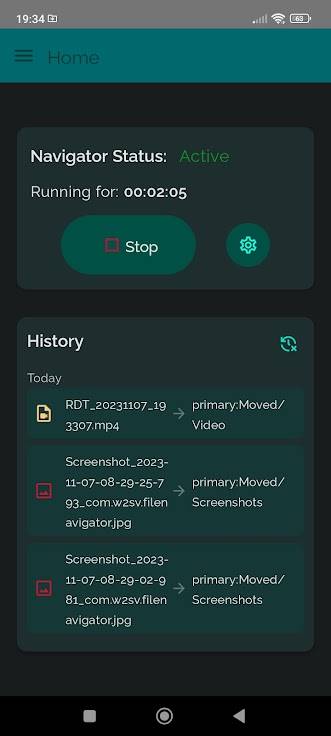
- 🔁 Auto-Move Functionality: Streamline your workflow further! If you receive multiple files of the same type, activate the auto-move feature. File Navigator automatically places them in the folder you previously selected.
- 🛡️ Precise Permissions: To deliver these exceptional features, File Navigator requests the ’access to manage all files’ permission. Rest assured, this permission is solely used to move files you explicitly command to be moved.
- 📱 Simplify Your Digital Life: File Navigator is the ultimate solution to keep your files organized and readily accessible. Enjoy a clutter-free device and manage your files with ease.
Don’t let file chaos overwhelm you. Say goodbye to clutter and embrace the power of precise file management!