FuckDevicePolicy App Mods app for Android description
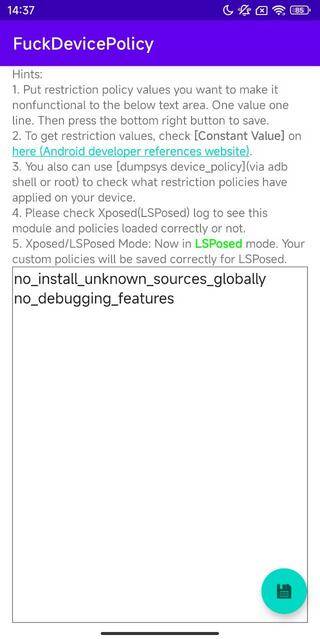
FuckDevicePolicy is an Xposed module that lets you render some user restriction policies (set by Device Admin App or Work Profile, e.g. Microsoft Intune) nonfunctional. Especially some device-wide policies, even it is in the Work Profile but affected the outside whole android environment (Your Personal Profile).
For example, since Android 10, a new feature for Work Profile added: DISALLOW_INSTALL_UNKNOWN_SOURCES_GLOBALLY, value is "no_install_unknown_sources_globally"). This allows the Work Profile App (For example, Microsoft Intune, aka Company Portal) disable the permission of installing APKs from unknown source GLOBALLY, even its inside the Work Profile, then you also can not install APKs in your personal profile! Another example of device-wide restriction is ensure_verify_apps, which can make Google Play Protect always enable.
If you are facing these problem, just use this Xposed module.
Check UserManager to get all restriction policy values (See [Constant Value]). Put those you want to disable in this module's App, one line one policy value. Use dumpsys device_policy (run via adb shell or root) to check what restriction policies applied on your device (under [userRestrictions:] section).
Only apply this module to [System Framework] (which is the default scope setting), no need to apply to any other apps, especially DO NOT apply to Microsoft Intune, otherwise your Xposed and ROOT will be detected.
Due to LSPosed's New XSharedPreferences, if you are using LSPosed, please Activate this module and reboot firstly, before edit and save your custom policies!!! (In another word, when you click the save button, this module should be activated, if you are using LSPosed). Otherwise your custom policies will not be saved correctly for LSPosed.