PhotoSphereGallery untuk Android

PhotoSphereGallery

minardil

versi 2.0

Gallery and viewer for spherical photos (360°).

Unduhan 0
Ads

Beri rating ini

Hasil pemindaian Antivirus & keamanan

Tanggal Pemindaian: Apr 30, 2026 Versi Perangkat Lunak: 2.0
Status: ✅ Dipercaya & Aman untuk diinstal Aplikasi ini ditandatangani oleh minardil dengan tanda tangan digital terpercaya dan diverifikasi dan akan memperbarui instalasi PhotoSphereGallery yang ada Sidik Jari Sertifikat: d1d49e39168a7b8d9623acfc4dec7d80066eb5a8 Penerbit: C:IT, CN:Giovanni A., O:EAGsoftware, ST:Italy Cara kami memverifikasi keamanan berkas APK
Antivirus Android Status
K7GW Bersih ✅
DrWeb Bersih ✅
VirIT Bersih ✅
ClamAV Bersih ✅
Google Bersih ✅
Ikarus Bersih ✅
Lionic Bersih ✅
Sophos Bersih ✅
Yandex Bersih ✅
Alibaba Bersih ✅
Tencent Bersih ✅
Xcitium Bersih ✅
Fortinet Bersih ✅
Kingsoft Bersih ✅
Symantec Bersih ✅
AhnLab-V3 Bersih ✅
Kaspersky Bersih ✅
Microsoft Bersih ✅
Trustlook Bersih ✅
ESET-NOD32 Bersih ✅
Avast-Mobile Bersih ✅
NANO-Antivirus Bersih ✅
BitDefenderFalx Bersih ✅

PhotoSphereGallery Album Foto aplikasi untuk Android deskripsi

Features

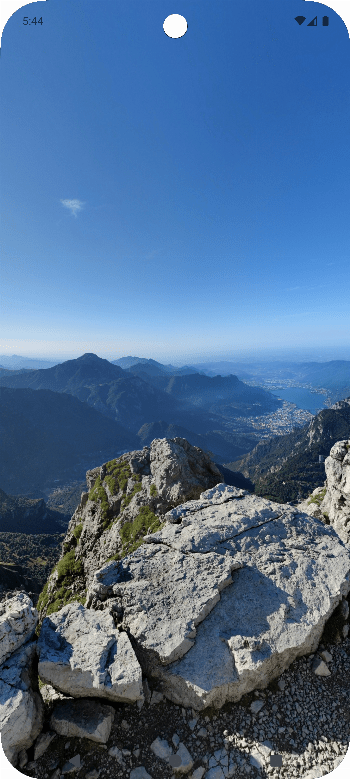
  • View compatible spherical photos (360°) in a rotatable 3D environment.
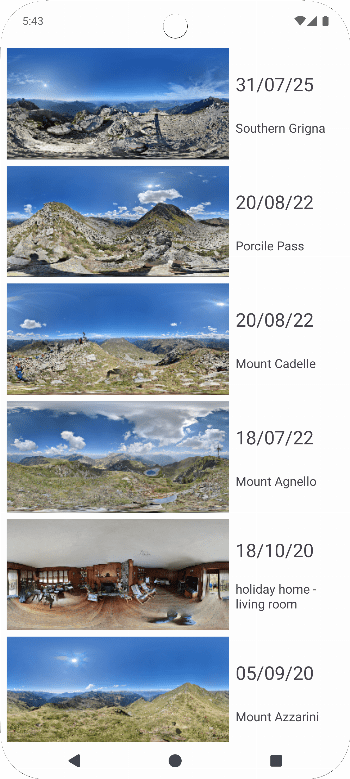
  • Display the list of all compatible spherical photos available on the device.
  • Insert or modify the description of spherical photos.
  • Delete images

How does it work? There are two ways to view your spherical photos:

  • Open the app: a list of all available spherical photos on the device is shown. By clicking on them, they will be projected in the 3D environment.
  • Directly from the image: by clicking the "share" button in your gallery or file manager, you can open the app and view the image projected in the 3D environment.

To view the image, swipe on the screen: the image will rotate accordingly.

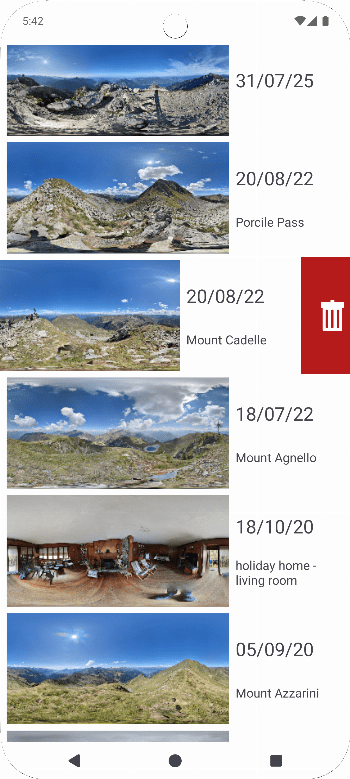
To modify the description or delete images, swipe the list item to the right/left.

Compatible Photos Currently, compatible photos must meet the following characteristics:

  • photos with a 2:1 aspect ratio
  • photos with one or more of the following tags set:
    • -XMP:XMP-GPano:UsePanoramaViewer = True
    • -XMP:XMP-GPano:IsPhotosphere = True
    • -XMP:XMP-GPano:ProjectionType = equirectangular
Ads


Spesifikasi


Versi Lama

PhotoSphereGallery icon

1.1 APK

October 5, 2025

PhotoSphereGallery icon

1.0 APK

September 13, 2025