Quick Timer สำหรับ Android

Quick Timer

Andrei Shpakouski

เวอร์ชั่น 1.0.1

Set and manage timer directly from your Quick Settings - no regular app screen!

ดาวน์โหลด 94
Ads

ให้คะแนนสิ่งนี้

☆ ☆ ☆ ☆ ☆

ผลการสแกนแอนตี้ไวรัสและความปลอดภัย

วันที่สแกน: Aug 16, 2025 เวอร์ชันซอฟต์แวร์: 1.0.1
สถานะ: ✅ เชื่อถือได้และปลอดภัยในการติดตั้ง แอปนี้ลงนามโดย Andrei Shpakouski ด้วยลายเซ็นดิจิทัลที่เชื่อถือได้และยืนยันแล้ว และจะอัพเดตการติดตั้ง Quick Timer ที่มีอยู่ ลายนิ้วมือใบรับรอง: cd2f08630e6d2cae319786605341235bf042fb0f ผู้ออก: C:World เราตรวจสอบความปลอดภัยของไฟล์ APK อย่างไร
แอนตี้ไวรัส Android สถานะ
K7GW ปลอดภัย ✅
DrWeb ปลอดภัย ✅
VirIT ปลอดภัย ✅
ClamAV ปลอดภัย ✅
Google ปลอดภัย ✅
Ikarus ปลอดภัย ✅
Lionic ปลอดภัย ✅
Sophos ปลอดภัย ✅
Yandex ปลอดภัย ✅
Alibaba ปลอดภัย ✅
Tencent ปลอดภัย ✅
Xcitium ปลอดภัย ✅
Fortinet ปลอดภัย ✅
Kingsoft ปลอดภัย ✅
Symantec ปลอดภัย ✅
AhnLab-V3 ปลอดภัย ✅
Kaspersky ปลอดภัย ✅
Microsoft ปลอดภัย ✅
Trustlook ปลอดภัย ✅
ESET-NOD32 ปลอดภัย ✅
Avast-Mobile ปลอดภัย ✅
NANO-Antivirus ปลอดภัย ✅
BitDefenderFalx ปลอดภัย ✅

Quick Timer นาฬิกาและปลุก แอป สำหรับ Android คำอธิบาย

Quick Timer Tile makes managing your time effortless and distraction-free.

Add it to your Quick Settings, and you’re ready to go – no app icon or traditional interface. Everything happens through a timer dialog and notification.

How to get started:

  1. Add the Timer to Quick Settings:
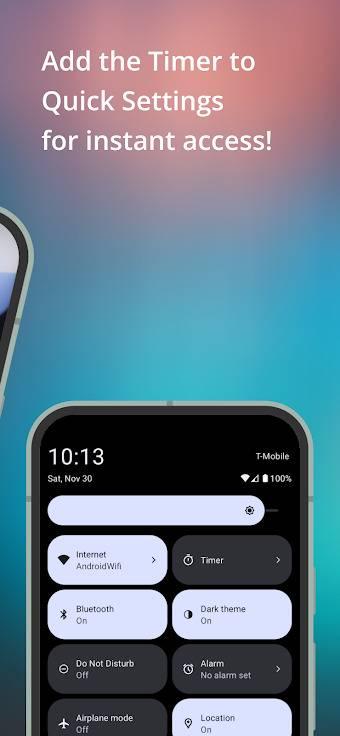
    • Swipe down from the top of your screen to open Quick Settings.
    • Tap the pencil icon or "Edit" to customize your tiles.
    • Drag the "Timer" tile into the active area.
  2. Set up your timer:
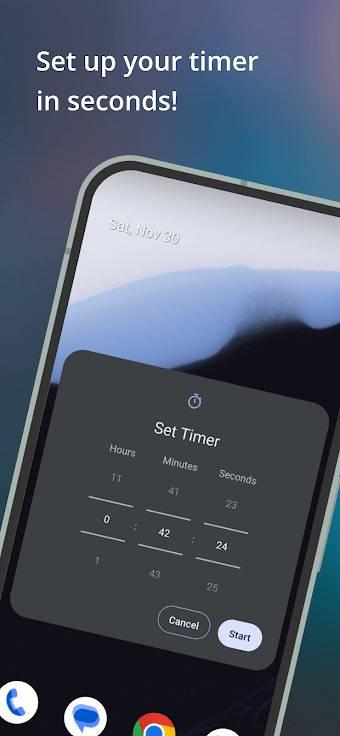
    • Tap the "Timer" tile to open the timer setup dialog.
    • Grant notifications permission (if needed).
    • Use the pickers to set the desired time and press "Start".
  3. Follow the Timer in Notifications:
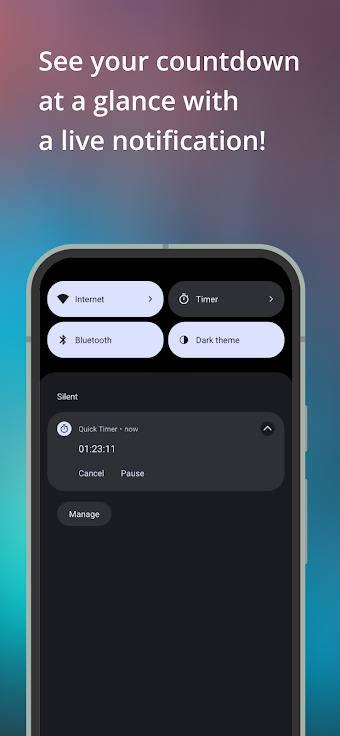
    • Once the timer starts, a notification shows the remaining time.
    • Pause, resume, or cancel the timer directly from the notification with one tap.

Why use Quick Timer?

  • Quick access: start a timer in seconds straight from Quick Settings.
  • No clutter: no app screen or icon – just a clean, efficient experience.
  • Convenient notification: always know how much time is left at a glance.

Perfect for cooking, workouts, or any activity where timing matters!

Ads


สเปค


เวอร์ชันเก่า

Quick Timer icon

1.0.2 APK

August 16, 2025

Quick Timer icon

1.0.3 APK

August 16, 2025


ให้คะแนนสิ่งนี้

☆ ☆ ☆ ☆ ☆

รีวิวผู้ใช้ เกี่ยวกับ Quick Timer

ยังไม่มีความคิดเห็นเกี่ยวกับ Quick Timer เป็นคนแรกที่แสดงความคิดเห็น!

GitHub Issue